登陆一个Django服务器的admin页面的时候出现如下错误:
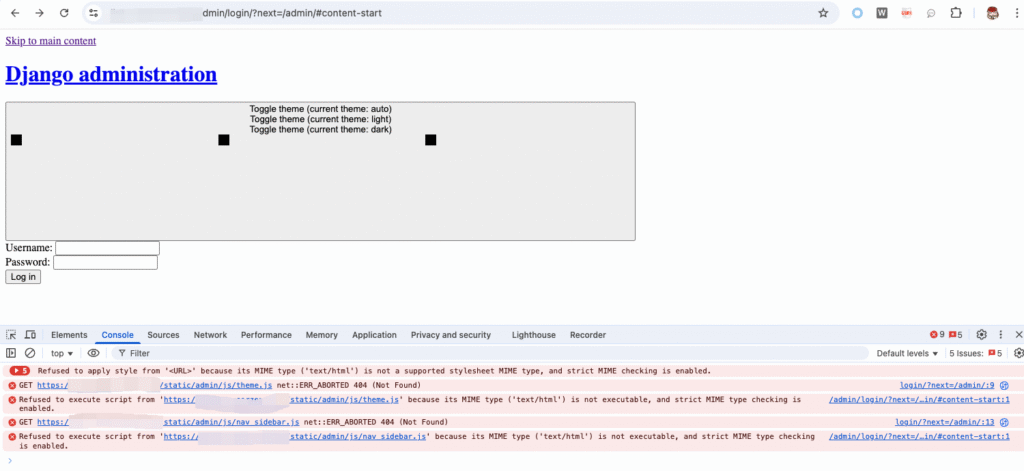
主要原因是没有把admin的静态文件写入到domain/static对应的文件里
在setting.py中配置:
# Static files (CSS, JavaScript, Images)
# https://docs.djangoproject.com/en/4.2/howto/static-files/

STATIC_URL = 'static/'
STATIC_ROOT = BASE_DIR / 'staticfiles'
这里设置的STATIC_ROOT是服务器本地目录,生成的静态文件会放在这里面。执行如下命令:
python manage.py collectstatic执行完了,会生成一些静态文件,大概像这样:
161 static files copied to '/web/backend/staticfiles'.配置Nginx:
server {
    listen 80;
    server_name dict.tensorzen.blog;

    location /static/ {
        alias /path/to/your/project/staticfiles/;
    }

    location / {
        proxy_pass http://127.0.0.1:8000;
        proxy_set_header Host $host;
        proxy_set_header X-Forwarded-For $proxy_add_x_forwarded_for;
    }
}
重启一下nginx就可以了
sudo systemctl restart nginx